
Website study / An example for Community venue
The Common Room
Can one welcoming place make two very different visitor journeys feel obvious?
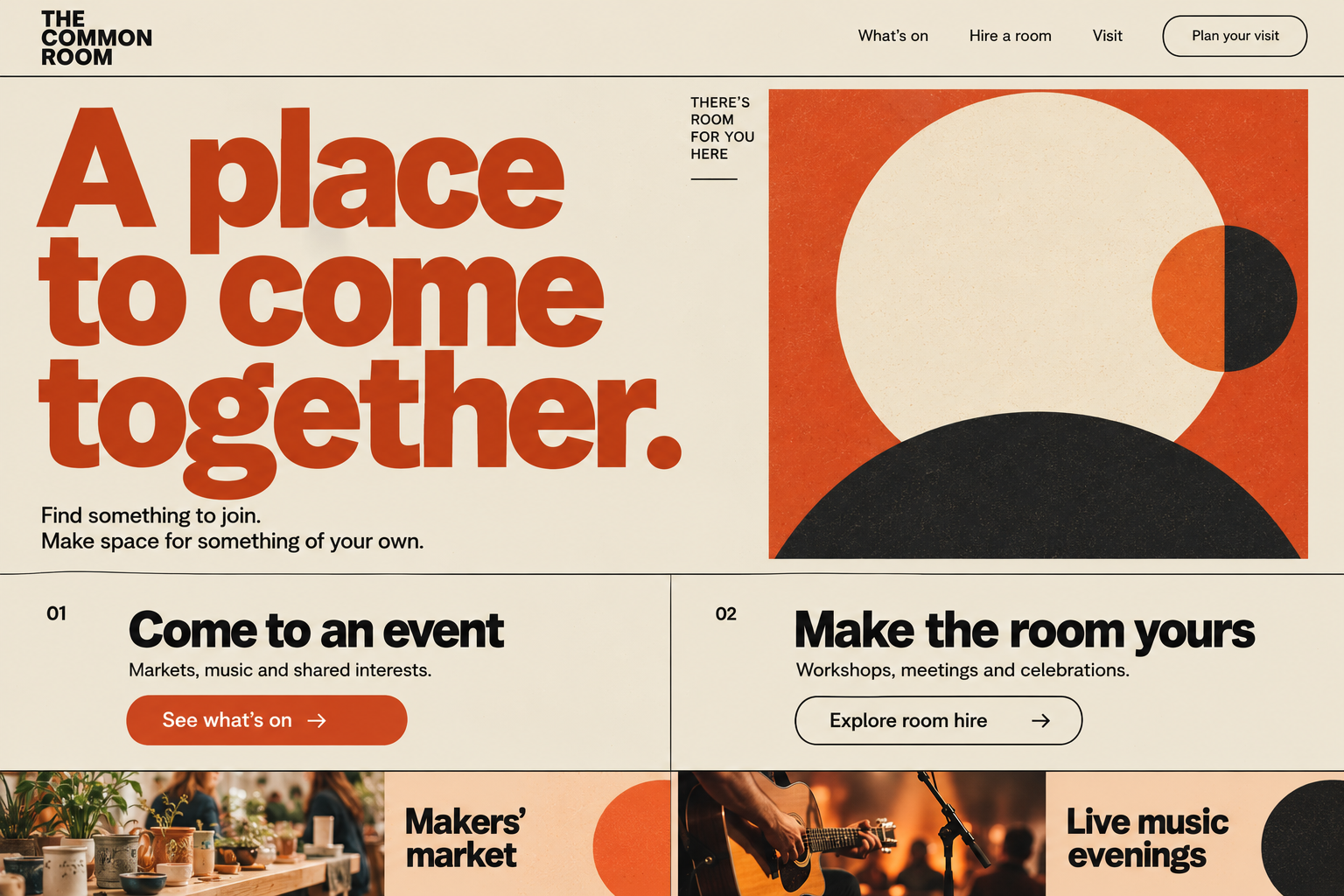
Someone looking for a music evening and someone organising a workshop may arrive at the same venue website with completely different tasks. This concept explores a welcoming shared identity with distinct routes to attending an event and hiring a room.
- The buyer
- Find your purpose
- The website
- Choose a clear route
- The working side
- Coordinate the space
Connection diagram · proposed system, not measured results
01 / Behind the website
A shared place does not mean a single task.
The community visitor needs a useful plan for attending. The organiser needs enough detail to assess a booking. The venue team needs to keep both promises consistent with a limited space and calendar.
- 01
The event visitor
Wants to know what is on, when it happens, how to attend and what practical arrangements apply.
- 02
The room organiser
Needs capacity, layout, facilities, availability and the real meaning of a booking enquiry.
- 03
The venue coordinator
Needs to prevent conflicts, record agreed requirements and keep event information current.
The uncertainty to remove
A friendly invitation can establish tone, while clear route labels reduce the need to infer what a venue means by “get involved”. We would test whether people recognise their own task in the first two choices.
The same page may serve confident regulars and people visiting alone for the first time. Research would investigate practical barriers and questions rather than assuming a warm colour palette makes everyone feel included.
02 / Behind the website
Every visible choice should earn its place.
The orange poster language gives the venue a strong presence. Its functional structure is deliberately simple: come to something, or make room for something of your own.
- 01
Two purposes in plain view
Event attendance and room hire are two understandable actions. Each needs its own information rather than one overloaded contact page.
Check it: Give people one attendance task and one organiser task; record which route they choose first.
- 02
Events with useful facts
Cards for markets and music can invite exploration, but a real event page must carry date, timing, booking rules and relevant access information.
Check it: Ask a visitor to plan attendance from a scenario and list anything they still need to ask.
- 03
Hire as a practical decision
An organiser needs capacity, setup choices and conditions before deciding whether to enquire. A welcoming headline cannot substitute for those facts.
Check it: Ask a workshop organiser to check a layout requirement and explain whether the room appears suitable.
Method behind these choices: How People Read Online: New and Old Findings (source, new tab).
03 / Behind the website
Observe the difference between attending and organising.
Discovery would involve occasional visitors, people with relevant access needs, organisers and the staff who manage the calendar. The aim is to understand the service rather than design for an imagined average visitor.
- Map the two journeys
Ask how people discover an event and how organisers choose a venue. Track the questions before, during and after the visit.
- Audit repeated enquiries
Review permitted, redacted messages for missing dates, layout questions, booking confusion and practical barriers.
- Prototype the route split
Build a simple event route and a hire route using realistic data, including sold-out or unavailable examples.
- Check the operational handover
Watch a coordinator use a submitted hire brief and verify whether the public information matches the actual room record.
Three realistic tasks for a prototype
Plan an event visit
Find the right date, timing, attendance process and practical information for a supplied event.
Record missing facts and wrong assumptions about free entry or booking.Check a room requirement
Assess whether a fictional workshop’s size and setup appear to fit the stated room.
Check capacity and layout comprehension without implying a confirmed reservation.Request a booking review
Send a hire enquiry with the date, purpose and setup requirements.
Review completeness and whether the organiser understands that availability still needs confirmation.
What would make this an honest evaluation?
Recruit people for both purposes; a result dominated by regular event visitors may hide problems for first-time organisers. Where appropriate, involve people with disabilities in relevant tasks rather than relying on an automated scan alone.
Measure wrong-route selection, fact retrieval and enquiry completeness separately. Attendance depends on programming, pricing, location and circumstances beyond a website; a redesign cannot claim credit for every fuller room.
Research practice: Using moderated usability testing (source, new tab).
04 / Behind the website
Original words. A reason for every page.
Original venue content would connect a consistent event calendar with practical room information. Repeating a generic community promise across every page would leave people with the same unanswered questions.
| Question or search intent | Original page response | Evidence to gather first |
|---|---|---|
| “what is on [venue or area]” | A current event listing with meaningful event pages and clear attendance rules. | Approved dates, organisers, cancellations and ownership of updates. |
| “room hire for workshop” | A room page with capacity by layout, facilities and the enquiry process. | Verified room dimensions, setup limits and operational rules. |
| “visit [venue] accessibility” | A factual visit guide with a route for asking a specific question. | A reviewed access description and a responsible contact. |
An event page should remain understandable when the event is cancelled, moved or sold out. Search titles and visible details would change together, and structured event data would be used only when appropriate and accurate.
The hire journey would distinguish an enquiry, a provisional hold and a confirmed booking. Search optimisation must not make an unavailable date or a capacity limit sound more flexible than it is.
Search phrases here are research seeds, not verified search volumes, rankings or traffic forecasts. Keyword research would validate demand, location, language and competition before publication.
05 / Behind the website
Make the assumptions visible.
Room-hire capacity is a useful unit for discussing the operational side. This example models bookable room-hours and a limited contribution while keeping attendance and community benefit outside the calculation.
Change the assumptions
Explore a room-hire capacity model
Use bookable hours, not all the hours in a calendar month.
Illustrative calculation · not a forecast
- Available room-hours / month
- 240 h
- Expected booked room-hours
- 96 h
- Hire revenue less stated variable cost
- £2,592
The arithmetic, openly shown
Available room-hours = rooms × bookable hours per roomBooked room-hours = available room-hours × booked proportion ÷ 100Contribution = booked room-hours × (hourly hire price − variable cost per hour)
This is not profit, community impact or confirmed demand. Setup and turnaround time, staffing, fixed costs, cancellations and unequal room capacities may materially change a real model. Negative contribution is possible.
From an attractive calculation to a trustworthy decision
Room-hours require a stable denominator. If an event occupies a room all afternoon, setup and clearance may remove additional time from hire inventory even when nobody is paying for those hours.
A venue might deliberately reserve capacity for community use. The financial scenario should support that decision, not silently redefine social value as hire income. Keep the operational and community objectives visible alongside any commercial measure.
06 / Behind the website
One calendar, with clear responsibilities around it.
Possible backend tools would connect the public event information and reviewed hire process to a consistent venue record. The goal would be fewer conflicting promises rather than a complicated system for its own sake.
- 01
Event publishing desk
Create approved events with dates, attendance rules and controlled cancellation updates.
Information in: Organiser, timing, description and reviewed practical details.
Useful output: Consistent public listings with a named update owner. - 02
Room and layout register
Keep capacities and permitted layouts attached to the right room.
Information in: Verified room facts and setup limitations.
Useful output: A reliable reference for the public page and the coordinator. - 03
Hire review workspace
Capture requests and distinguish enquiry, hold and confirmed states.
Information in: Preferred date, purpose, people and setup needs.
Useful output: A review queue with clear status and outstanding questions. - 04
Calendar conflict checker
Warn an authorised coordinator when a proposed booking overlaps a confirmed commitment.
Information in: Confirmed reservations, turnaround rules and room dependencies.
Useful output: A visible conflict requiring a human decision instead of a silent double booking.
Permissions, human decisions and things that can go wrong
An event organiser’s public contact information and a private hire requester’s personal details need different handling. Separate public publishing fields from restricted notes and agree retention for abandoned requests.
A conflict checker should account for shared facilities and setup time where relevant. A failed email must not make a booking appear confirmed, and cancelling a room booking should trigger the appropriate human review of dependent public information.
Potential software only. These modules are not running behind the pictured website. Requirements, integrations, data protection, capacity, cost and support would be agreed before a real build.
07 / Behind the website
Evidence informs the idea. Testing earns confidence.
This venue has community, consumer and organiser journeys. General B2B research may help frame a business hire conversation, but it cannot be used as a benchmark for attendance or belonging.
- Keep route performance separate
Assess event attendance tasks and room-hire tasks on their own terms.
- Reconcile public facts with the calendar
Test changed dates, sold-out events, provisional holds and cancellations.
- Include people who face barriers
Use relevant access research and practical visit questions, with honest limits on what has been assessed.
Read the sources and the limits of each one
Learning about users and their needs (source, new tab)
Investigate users’ goals, current approach and difficulties. Treat untested internal opinions as assumptions.
Scope: Public-service research guidance includes people who use, provide and support a service.
Limit: Transferable practice guidance, not a B2B revenue experiment or a claim that research has already been conducted for these concepts.
How People Read Online: New and Old Findings (source, new tab)
People commonly scan for information, with reading depth varying by task, motivation, focus and person.
Scope: The publisher summarises eyetracking research spanning 13 years, more than 500 participants and over 750 hours.
Limit: Reading is not always shallow and no single scanning pattern fits every page. This is not a measured sales uplift for these concepts.
Memory Recognition and Recall in User Interfaces (source, new tab)
Visible choices and contextual cues can support recognition instead of asking people to recall information unaided.
Scope: A cognitive-psychology explanation applied to menus, search and interface content; published January 2024.
Limit: A design heuristic, not proof of universal behaviour or a specific conversion increase. Labels still need testing with the intended audience.
Using moderated usability testing (source, new tab)
Observe actual or likely users attempting believable tasks to reveal language, navigation and interaction problems.
Scope: Guidance covers recruitment, neutral task instructions, consistent discussion guides and accessible sessions.
Limit: Small qualitative tests expose contextual problems; they do not establish population conversion rates or commercial causation.
Creating helpful, reliable, people-first content (source, new tab)
Create original, useful content for an intended audience, drawing on genuine knowledge and clear sourcing; apply SEO to help that content be discovered.
Scope: Google’s published content self-assessment guidance, including purpose, originality, accuracy and trust.
Limit: Guidance is not a ranking guarantee. Length, exaggerated claims and copied summaries do not substitute for useful information.
SEO Starter Guide (source, new tab)
Write useful original content, anticipate the words different readers search for, and connect related pages with descriptive links.
Scope: Official introductory guidance on content, discoverability, images, search titles, snippets and site organisation.
Limit: Google does not guarantee indexing or first place. Search snippets may come from page text rather than the meta description; keyword repetition is not a sound strategy.
Involving Users in Evaluating Web Accessibility (source, new tab)
Working with disabled users reveals practical barriers; combine it with standards-based accessibility evaluation.
Scope: Guidance covers user evaluation, assistive technology, reporting scope and cautious interpretation of small studies.
Limit: User testing alone does not establish WCAG conformance, and a few participants cannot represent every disability or access need.
Web Vitals (source, new tab)
The published good-experience thresholds are LCP at most 2.5 seconds, INP at most 200 milliseconds and CLS at most 0.1.
Scope: Assess the 75th percentile of real page loads, separately for mobile and desktop, across all three Core Web Vitals.
Limit: These are performance targets, not measured results for the concepts. A laboratory result is diagnostic and is not equivalent to representative field data or a sales forecast.
Your business would have its own starting point
Make it easier to find a place and organise a purpose.
Darren can begin with the repeated question at the front desk or the booking detail staff keep having to chase. That gives a website and software brief a useful real-world anchor.