Bespoke software development for your business

Software that makes
everyday work easier.

If your team keeps copying details, chasing replies or checking different systems, everyday work takes longer.

Our custom software development starts with a real task. We work with your team, find where it gets stuck and build a tool around the change you agree.

You bring
A real task, the people doing it and what causes trouble.
We create
A tool showing the information, the next task and who handles it.
This helps
Your team can do less copying and chasing.
See how we make a task easier

Start with Darren at DS Repro and one task you would like to improve.

An example · Time spent on a repeated task

Time a small daily task can take.
220team hours
across a working year
Person A55 hours
Person B55 hours
Person C55 hours
Person D55 hours

If each of four people spends 15 minutes a day on the task, for 220 working days.

15 minutes × 4 people × 220 days ÷ 60 = 220 team hours, or 27.5 eight-hour team-days.

Time allocated to a hypothetical task, not a client result. Research and a trial establish what could actually be recovered. This is not a salary saving or profit figure.

  • You show us the work

    A real task and the part that causes trouble.

  • We shape a useful answer

    Clear screens, sensible rules and the right connections.

  • Your team tries it

    Check what improves before taking it further.

The MarketAccord delivery model

Make a useful tool financially possible.

Start with the awkward task. Explore a solution that fits the work and your budget.

90%
of each project’s working hours volunteered by collaborating teams
90% · Volunteered time
Expertise and working time shared across several teams.
10% · Other project hours
The remaining working time is agreed in the project scope.

How this helps your project

Through MarketAccord, several teams combine their skills and voluntarily contribute 90% of each project’s working time. That shared effort helps professionals and businesses investigate, build and test software around the way they work.

The teams’ shared effort makes specialist investigation and development more accessible. The aim is a fraction of the cost of a comparable UK agency build, with connections, paid services and ongoing care agreed for your scope.

Talk through one task and its budget

90% refers to project working hours. Your quotation sets the paid work, third-party services, hosting and ongoing support. The hours contribution does not determine a fixed price discount.

A useful change, made tangible

Give the next task
a clear place to go.

A shared record can bring the enquiry, its owner and the next action together. This imagined screen shows one possibility; your actual tool follows the work we investigate with you.

Software concept: a new customer enquiry moves through received, assign and follow-up stages, with a named team and a useful reminder.
An enquiry, its owner and the next action, brought together.Illustrative concept · Sample data

The change you can picture

The same enquiry.
A much clearer handover.

Imagine a customer asks about availability. The message is in an inbox, the details are in a spreadsheet and someone has to ask who is replying.

Before-and-after enquiry concept: scattered inbox and tracker records become one team record showing the owner, next action and reminder.
The same enquiry, shown as scattered messages and as one assigned record.Illustrative concept · Sample data

Where the effort goes

Finding the message.
Copying the detail.
Chasing the owner.

What a useful tool could bring together

The enquiry.
The person responsible.
The next action.

One shared record helps the next person understand the task. Your team still checks availability and handles the conversation.

Which handover creates the most chasing in your business?

Show us where work gets stuck

How the right answer takes shape

Understand the job.
Make the change testable.

A good-looking dashboard is only useful when it solves the right problem. We follow the actual work before agreeing the software. Darren helps coordinate the brief and your feedback.

Look at the real task

Walk through an ordinary example and a difficult one. Find repeated effort, missing details and unclear responsibility.

You review: the problem, the people involved and a starting point to compare.

Research: understand user needs
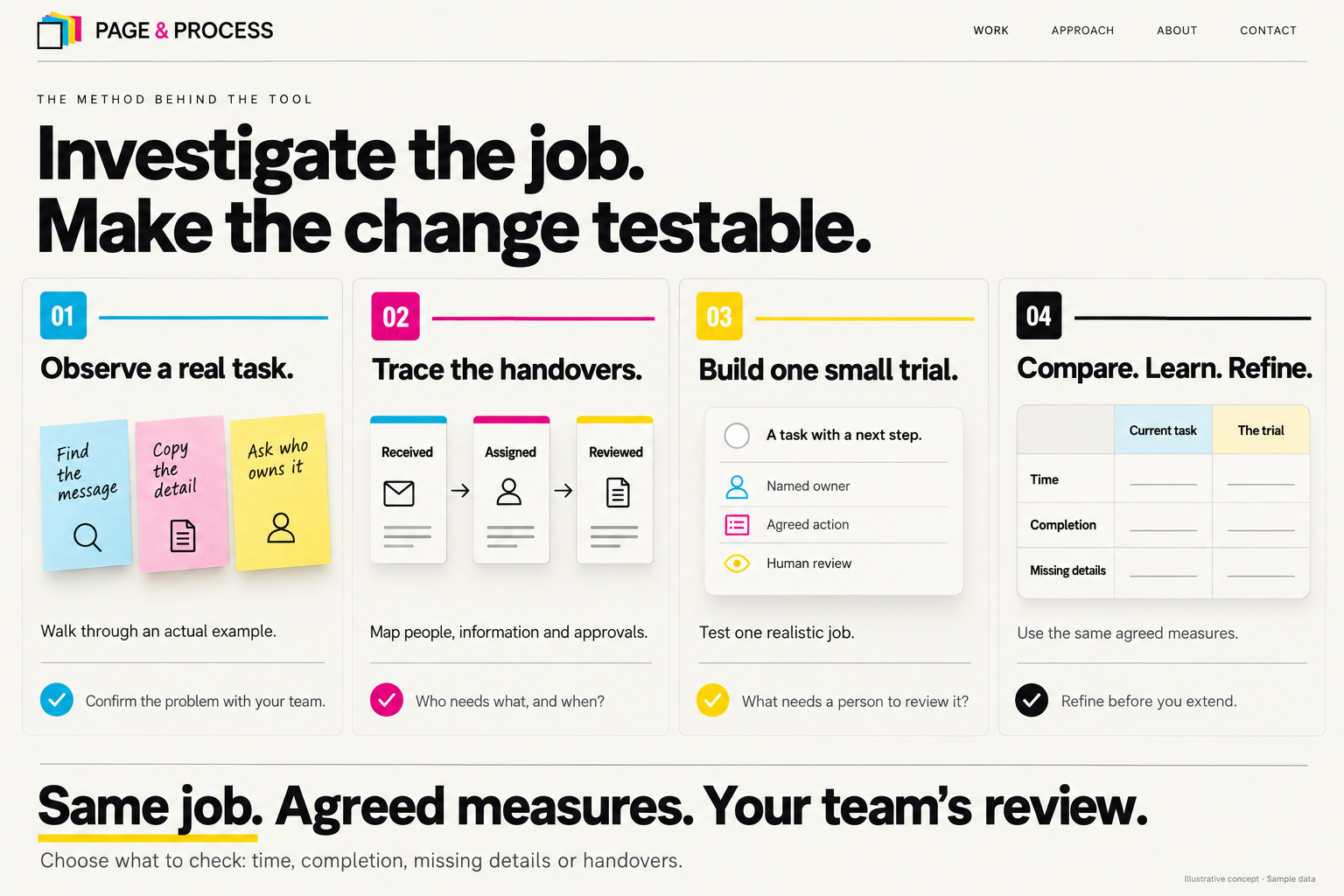
Choose the useful change

Map the handovers and check existing systems. The answer may be a better connection or a change to something you already own.

You agree: what to improve, what is included and which connections are possible.

Research: map the experience

Try a focused version

Build the agreed workflow and try realistic tasks with the people who will use it. Include mistakes, approvals and missing information.

You see: a working trial and a clear way to explain what needs changing.

Research: test a prototype

Check, refine and hand over

Compare the trial with the original task. Agree the refinements, explain how it works and settle ownership and ongoing care.

You receive: the agreed tool, guidance and a support arrangement.

Research: use evidence to improve
Four illustrated software research stages: observe a real task, trace its handovers, build one small trial, then compare the same agreed measures.
From observing the job to comparing a small trial with the starting point.Illustrative concept · Sample data

These GOV.UK guides inform the method. Your own trial checks time spent, completion, missing details or responsibility. Improvements need evidence from your work.

Start with a task you can explain in everyday language.

Bring a useful first brief

What could be possible for you?

Recognise the job.
Picture the possibility.

A tool can sit inside your business, behind your website or between services you use. These examples show the kinds of problems we can investigate.

Illustrative concepts with sample data. The screens show possibilities; your scope, connections and results are established with you.

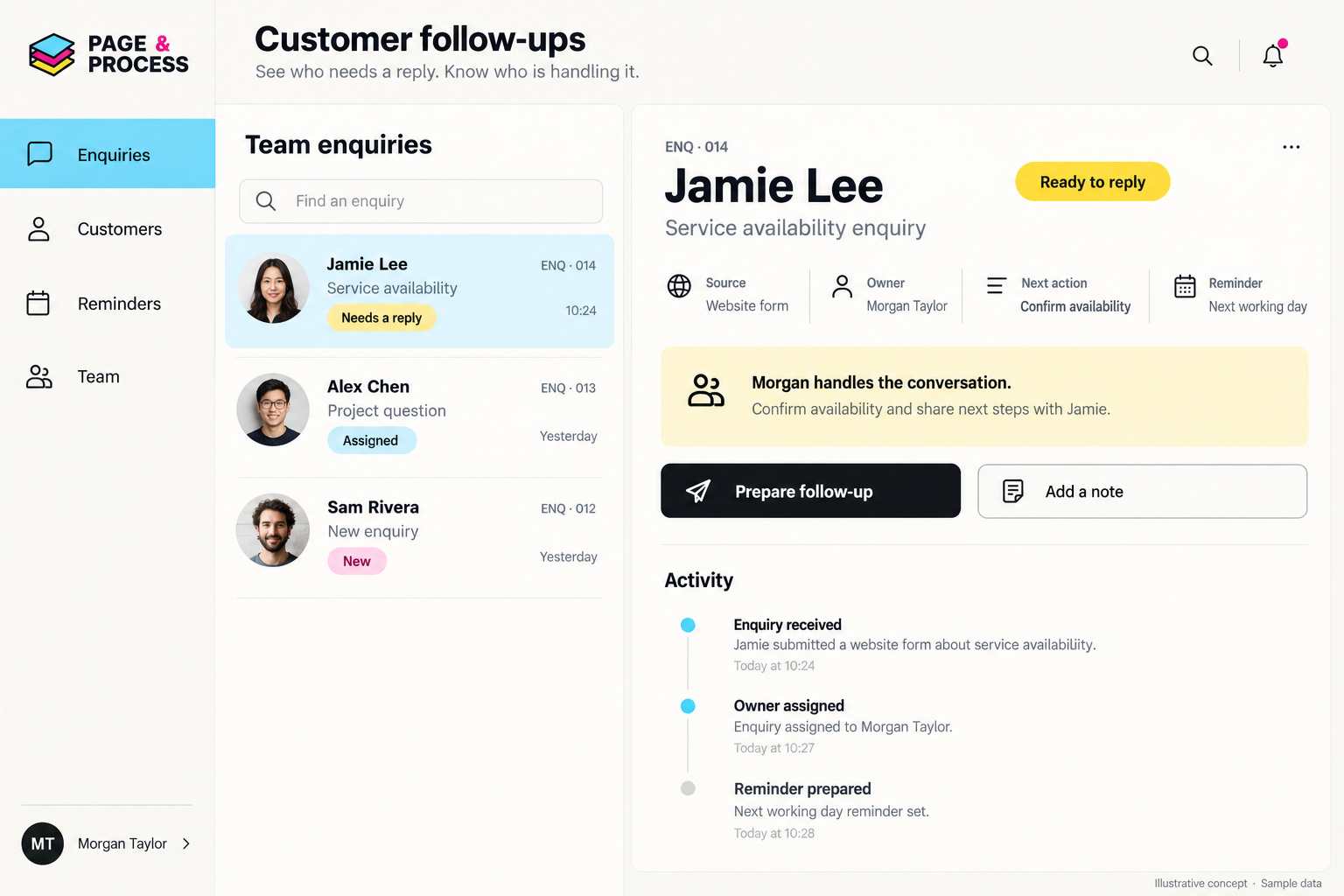
Customer follow-ups

Illustrative customer follow-up workspace with three enquiries, a named owner, a prepared next action and a short activity history.
A shared customer record makes the owner and follow-up visible.Illustrative concept · Sample data
The friction
Enquiries sit in different inboxes. Nobody is quite sure who replied.
A useful tool
A shared customer record with an owner, the next action and a reminder.
Your decision
Your team handles the conversation and agrees who may see each record.

Stock & restocking

Illustrative inventory dashboard flags an item below its reorder level and prepares a draft order for a person to review.
A low level prepares a draft reorder for a person to check.Illustrative concept · Sample data
The friction
Repeated stock checks still leave shortages as an unwelcome surprise.
A useful tool
Track stock against agreed levels and prepare a draft reorder when it runs low.
Your decision
A person approves orders. Automatic ordering needs supported suppliers, spending limits and duplicate checks.

Social content & publishing

Illustrative content studio arranges ideas, drafts and posts awaiting review, with a words, artwork and claims checklist before publishing.
Ideas, drafts, review and the publishing plan share one workspace.Illustrative concept · Sample data
The friction
Ideas, artwork and approvals get scattered before a post reaches the calendar.
A useful tool
Use your brief and available account insights to organise drafts, reviews and a publishing plan.
Your decision
You approve words, images and claims. Publishing uses supported accounts and agreed permissions.

Bookings & reminders

Illustrative weekly team calendar with a selected site consultation, assigned team member, availability and a reminder to review before sending.
Team availability, the selected booking and its reminder sit together.Illustrative concept · Sample data
The friction
Arranging an appointment takes repeated messages and diary checks.
A useful tool
Bring availability, bookings, responsibility and planned reminders into one view.
Your decision
Agree calendar access, confirmation steps and what happens when plans change.

A private customer area

Illustrative private project space brings together files, an artwork review, a request awaiting reply and a three-stage project progress list.
A customer sees the files, requests and progress relevant to their account.Illustrative concept · Sample data
The friction
Customers keep asking for the latest file, an update or a request's status.
A useful tool
A login area with each customer's own documents, requests and progress.
Your decision
Set account access, current versions and the points that need review.

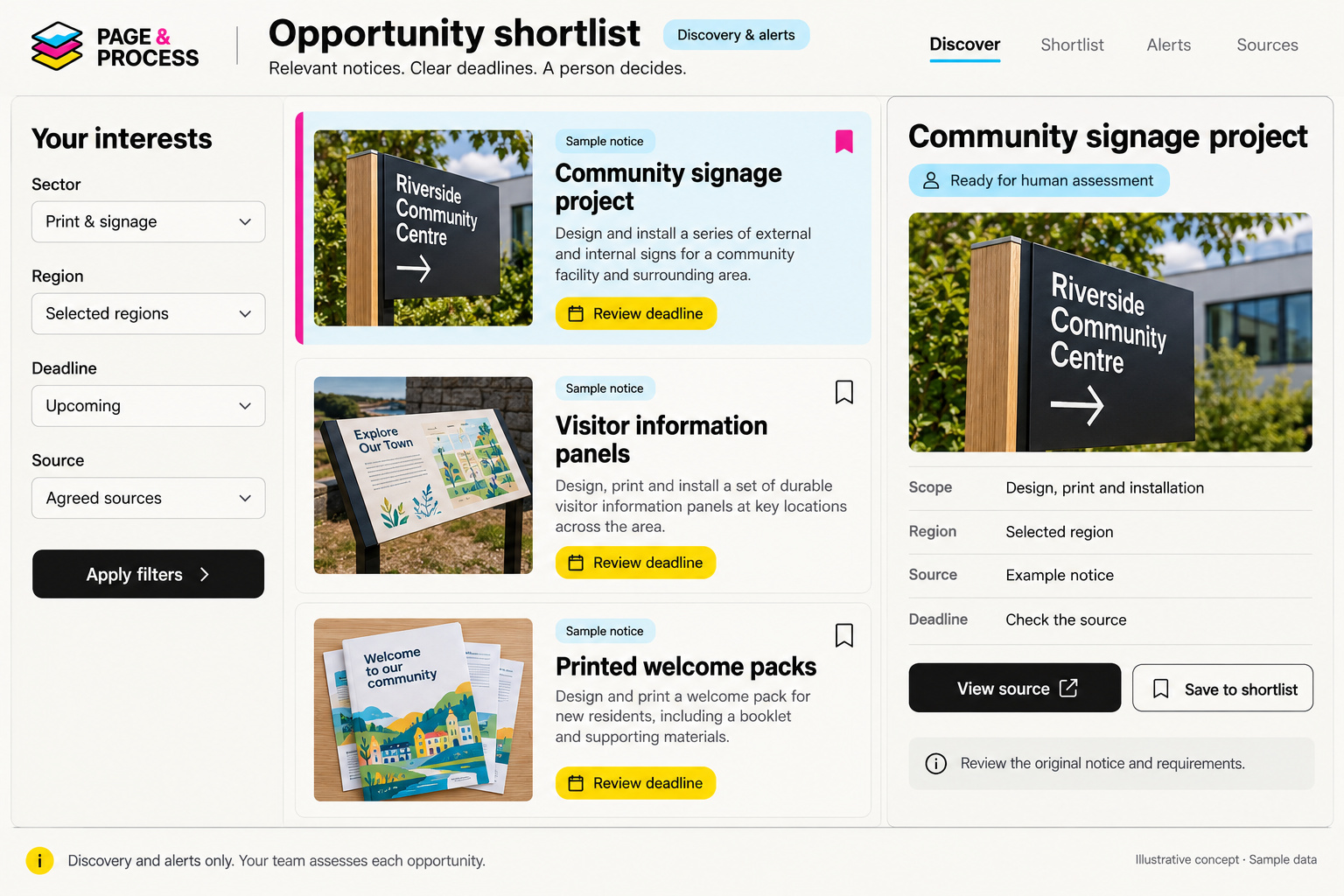
An opportunities engine

Illustrative opportunities shortlist filters sample notices by interests and region, shows deadlines and original sources, and leaves assessment to a person.
Interests narrow a sample shortlist; a person assesses the original notice.Illustrative concept · Sample data
The friction
Relevant business notices are spread across sources with different deadlines.
A useful tool
Filter agreed sources into an opportunity shortlist with deadline alerts.
Your decision
Your team reads the original notice and decides what to pursue. This is discovery and alerts.

You can start small, then extend what proves useful.

Discuss the possibility closest to your work

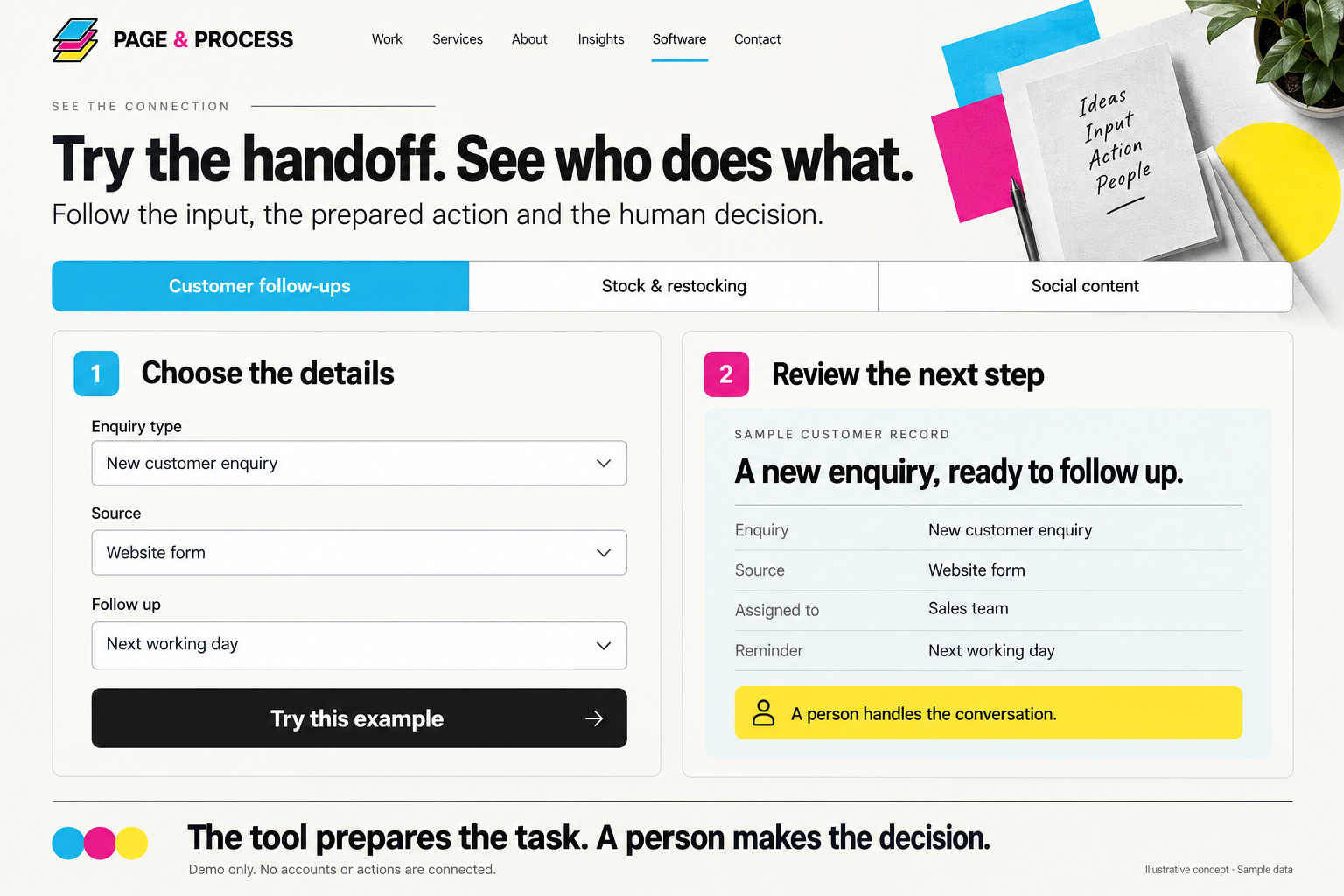
What happens behind the screen?

Information comes in.
A useful next step comes out.

The visible screen is only part of the tool. Behind it are agreed rules for ownership, permissions, reminders and the actions that need a person's approval.

Handoff demonstration concept: choose an enquiry type, source and follow-up interval, then review the prepared customer record and human decision.
An illustrated handover: the information received, the next step prepared and a person’s review.Illustrative concept · Sample data

A customer enquiry, made clear

  • The information arrives

    A website enquiry carries the customer's details and the help they are asking for.

  • The next task is prepared

    Agreed rules assign the enquiry, record its source and prepare a reminder.

  • A person takes it forward

    The owner checks the details and replies. The record shows what happened and what remains.

The supplied interface is an illustration. Nothing on this page connects to an account or sends an action.

A private workspace can make the right information easier to find.

See where a customer tool could live

What you can expect

Clear decisions.
Something useful.
Help to take it on.

  • A brief everyone understands. The task, intended improvement, included work and a practical check for the trial.
  • A tool built around that brief. The agreed screens, working rules and supported connections, reviewed with your team.
  • The details settled before launch. Access, ownership, hosting, service fees, guidance and ongoing support.

Connections are checked before they are promised. If a service is unavailable or a detail is missing, the agreed workflow needs a clear next step.

Three illustrated working principles: people stay in control, connections are checked first, and costs and care are agreed, followed by an invitation to talk to Darren.
Access, approvals, connections and ongoing care are agreed around the job.Illustrative concept · Sample data

Bring an example of the work, with private customer details removed.

See what to bring to the conversation

A conversation before a specification

What would you like
to make easier?

Show Darren at DS Repro the task that takes too much effort. We will explore the options, the likely scope and a sensible place to begin.